
Uspořádej PRO ligu s digitálním zápisem
Čeho dosáhneš: ligu připravenou ke hře — kluby jsou v ní, týmy přihlášené, zápasy vygenerované a rozmístěné na hrací dny, první hrací den (jornada) zveřejněný — a jasnou představu o tom, co se děje v den zápasů.
Předpoklady: účet svazu (nebo klubu) s přístupem do Competition Manageru. Viz Otevři Competition Manager.
Přečíst přepis
League day.
Fixtures in a spreadsheet, fourteen group chats, paper scoresheets… and who's refereeing court two?
Running a league shouldn't feel like a second job. Let's fix that.
In Volley World, a league runs two ways: a federation league between clubs, or your club's own league, with Club PRO. Same screens, same steps.
It all starts with Create league.
The sport: indoor. The season and the category. Two legs, home and away. Best of five, because the play-off format follows the sport.
The points table, and the rulebook: PRO or amateur.
Publish!
Now, who does what? You invite the clubs.
A club that's new to Volley World registers in about two minutes. Club staff sign up their teams, and you decide what each club may do.
Players follow everything in the app… and referees get called up.
Then, step by step.
Generate matches: fourteen rounds, the whole season.
Add your playing days, and drop the rounds onto them.
Open a playing day: attach the venue, auto-assign the courts… and publish.
Players and referees get it on their phones.
Speaking of referees: invite them to your pool, and call them up.
They confirm on their phone… and their Volley World app opens a referee area of its own: what's next up, the clubs they referee for, and their refereeing record.
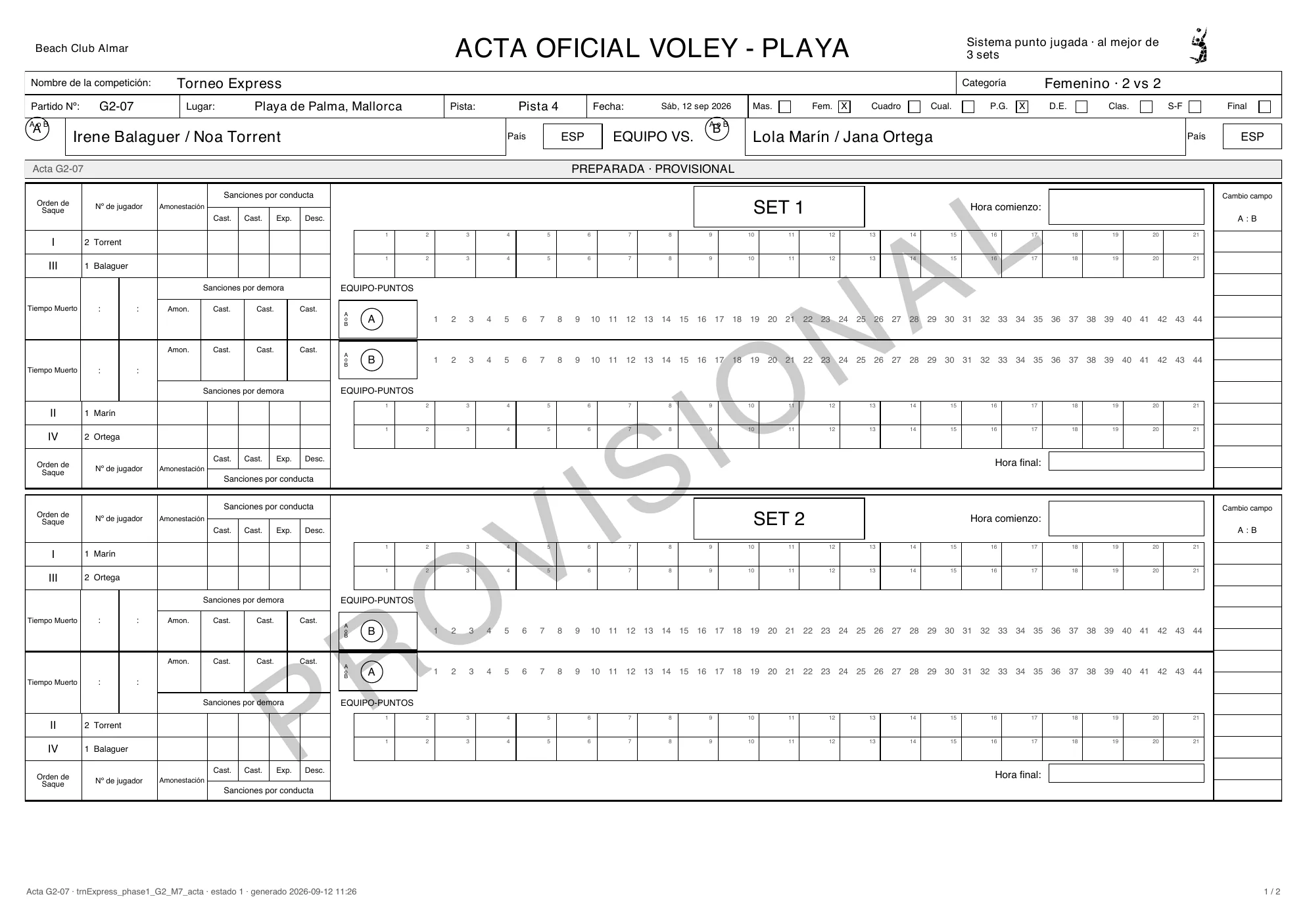
Match day! With a PRO rulebook, every match has its acta digital.
Start the playing day.
The captains sign, the referee keeps the score point by point, and everyone signs at the end.
Closed, and sealed by the server.
The signed scoresheet is ready to download.
With an amateur rulebook, the referee simply enters the final sets.
Every result updates the standings on its own.
Seed the play-offs straight from the table… and close the season.
And for every European federation: your data is hosted in the European Union.
From the first invite to the last whistle: one league, every role.
That easy!




Federation staffClubs → Invite a club: search a club that is already on Volley World and click Invite. Not on Volley World yet? Invite by email — the contact person gets the invitation, registers the club for free and it joins your league. Playing alone? Invite nobody and skip ahead.
Club staffTeams arrive three ways: club staff register them from their own view of the league, captains sign up in the Volley World app through their club’s sign-up link, and you can add them by hand — or add dummy teams for a test run.
Federation staffMatches → Generate matches creates every match of the regular season at once, grouped in rounds by entry ranking: #1 meets the last entry in round 1. A round is not a playing day yet.
Federation staffPlaying days → Add playing day. Click several dates to add several jornadas at once, and pick the host club. A day without a venue is flagged — it can be planned, but not published.
Federation staffBack in Matches, drag a whole round (or a single match) onto a playing day — or let Distribute rounds put one round on each day, in order.
Federation staffOpen the jornada: Attach a venue, place the matches on the courts with Auto-assign, Publish playing day, and invite your referees. The referee answers on her phone.
RefereeStart playing day opens the scoresheets. The referee opens the electronic scoresheet in the Volley World app: the captains read and sign, the match is scored point by point, and the 1st referee signs last and closes the acta.
PlayerEvery closed result recomputes the standings — in the Competition Manager and in every player’s app. Play-offs are seeded from this table when the regular season is done.
Čtyři strany
Sekce “Čtyři strany”| Strana | Pracuje v | Co dělá |
|---|---|---|
| Personál svazu (pořadatel) | Aplikace pro svazy a Competition Manager | Vytvoří ligu, pozve kluby, vygeneruje zápasy, vytvoří hrací dny (jornadas), nastaví místa konání, kurty a rozhodčí, zveřejní a spustí každý hrací den, opravuje výsledky, uzavře sezónu. |
| Personál klubu | Vlastní Competition Manager svého klubu | Přijme pozvánku do ligy (nebo z pozvánky v e-mailu klub zaregistruje), přihlásí týmy a — pokud to povolíš — pořádá hrací dny, upravuje soupisky nebo zadává výsledky. |
| Hráči | Aplikace Volley World, nebo přihlašovací odkaz klubu v jakémkoli prohlížeči | Kapitán přihlásí tým přes přihlašovací formulář ligy. Všichni sledují rozpis zápasů a tabulku. |
| Rozhodčí | Aplikace Volley World (telefon nebo tablet) | Připojí se do tvé databáze rozhodčích, potvrdí hrací dny, na které jsou povoláni, a vedou digitální zápis: kapitáni podepíšou, skóre se zapisuje bod po bodu a uzavřením zápisu jde výsledek do tabulky. |
Ligový dashboard
Sekce “Ligový dashboard”Otevři ligu a jsi na jejím dashboardu: vlevo tmavomodrý panel — Overview · Settings · Clubs · Teams · Fixtures · Calendar · Dates · Standings · Play-offs · Officials · Close — a nahoře hlavička s názvem ligy, Back to leagues, řádkem jako League · 2026/27 · Cadete · A2 · Mixed a stavem ligy (Draft, Registration, Running, Play-offs, Closed).
Overview odpovídá na otázku Where the league stands (kde liga stojí) ukazatelem kroků — Setup → Clubs → Teams → Matches → Playing days → Running → Play-offs → Closed — a vypisuje What needs attention (co vyžaduje pozornost): ještě nepřijal žádný klub, ještě nejsou žádné hrací dny, zápasy nepřiřazené k hracímu dni, dny bez místa konání, chybějící pravidla nebo přihlašovací formulář.
Kroky
Sekce “Kroky”- Vytvoř ligu — formát, počet kol, doma a venku, formáty zápasů, bodovací tabulka, přihlašovací formulář a cena, kde je liga uvedená.
- Pozvi kluby — vyhledej klub na Volley World, nebo použij Invite by email, pokud tam ještě není. Only your own club or federation plays? Invite nobody and skip this step. Hraje jen tvůj vlastní klub nebo svaz? Nezvi nikoho a tento krok přeskoč.
- Týmy se přihlásí — ručně, jako testovací týmy na zkoušku, nebo přes přihlašovací odkazy klubů a tvůj přihlašovací formulář.
- Vygeneruj zápasy — Generate matches vytvoří všechny zápasy základní části z potvrzených týmů, seskupené do kol podle vstupního pořadí. Kolo ještě není hrací den: nic zatím nemá datum.
- Vytvoř hrací dny a rozmísti zápasy — Add playing day v Playing days, potom v Matches přetáhni kola na dny (nebo použij Distribute rounds). Rozpis ligy existuje, jakmile zápasy sedí na svých hracích dnech.
- Připrav každý hrací den — Attach a venue, Add courts, Assign referees, potom Publish playing day.
- Den zápasů — Start playing day; rozhodčí vedou digitální zápis na svých telefonech a každý uzavřený zápis aktualizuje tabulku.
- Tabulka a play-off, potom uzavři sezónu.
Kdo kdy jedná
Sekce “Kdo kdy jedná”- Ty (personál svazu) děláš všechny kroky v Competition Manageru — a cokoli můžeš i dodatečně opravit.
- Personál klubu odpovídá na pozvánku, přihlašuje své týmy a, pokud mu to dovolíš, pořádá hrací dny. Viz Co smí který klub.
- Hráči se přihlašují přes formulář a sledují rozpis zápasů a tabulku.
- Rozhodčí potvrzují své hrací dny a zapisují do digitálního zápisu.
Řešení problémů
- Týmy se nemůžou přihlásit. Nová liga začíná se zavřenými přihláškami. Přepni ji v hlavičce ligy na Registration open — a pokud se mají týmy přihlašovat samy, připoj v Settings přihlašovací formulář.
- „Create the playing days in the Calendar first“. Zápasy se pokládají na hrací dny, takže dny musí existovat dřív, než můžeš zápasy rozmístit.
- Hrací den nejde zveřejnit. Ještě nemá místo konání: Add a venue to publish.
- Liga pořád ukazuje Draft, přestože se hrají zápasy. Zveřejnění hracích dnů stav ligy nemění. Když sezóna začne, přepni ji vpravo nahoře na Running.